在谈SSM框架的搭建之前,聊一聊这个项目的特点之一: 分布式架构

架构以及传统的“集群架构”和“分布式架构”的区别

单机架构

讲集群架构之前,要先提一下单机架构。例如一个简单的web项目,这个项目被部署在一个服务器上,这样的架构模式就是单机架构。显而易见:单个服务器能够处理能力是有限的,当这个项目不断添加新的业务处里,访问量不断增加时,单机往往无法负荷,最常见的就是访问某个网站时页面显示过慢(没错!同志!有时候打开一个网页打开半天其实不是你网速不行)

集群架构

单个服务器应付不过来,那就多来几个。将原来部署在单机的项目复制几份,分别部署在其他服务器上,构成一个“群”,一个服务器就是这个集群上的一个节点,每个节点处理同样的业务。当有客户访问服务器时,“负载均衡服务器”就会将客户引导向集群中负载较小的节点,以此提供给客户最好的访问体验。
我个人都集群架构解决单机架构问题的方式,称之为“暴力破解”。

  • 优点:解决单个服务器业务过多访问量过大时出现安全问题
  • 缺点:耦合度高;增加了运维成本;不能灵活部署。

分布式架构

例如一个web电商项目,其业务类型一点是多样的,“用户服务”、“商品服务”、“后台管理服务”等。分布式架构,即将一个完整的系统拆分成多个子系统(子项目),分布在不同的服务器中,这一个个服务都是一个个独立的项目,可以独立运行。服务之间又存有依赖,数据流通。

  • 优点:模块独立,耦合度低;独立运维;灵活部署
  • 缺点:需要额外开发模块间的数据通讯

显然将分布式架构应用在一个会被大量用户的访问的WEB项目是再好不过的选择。

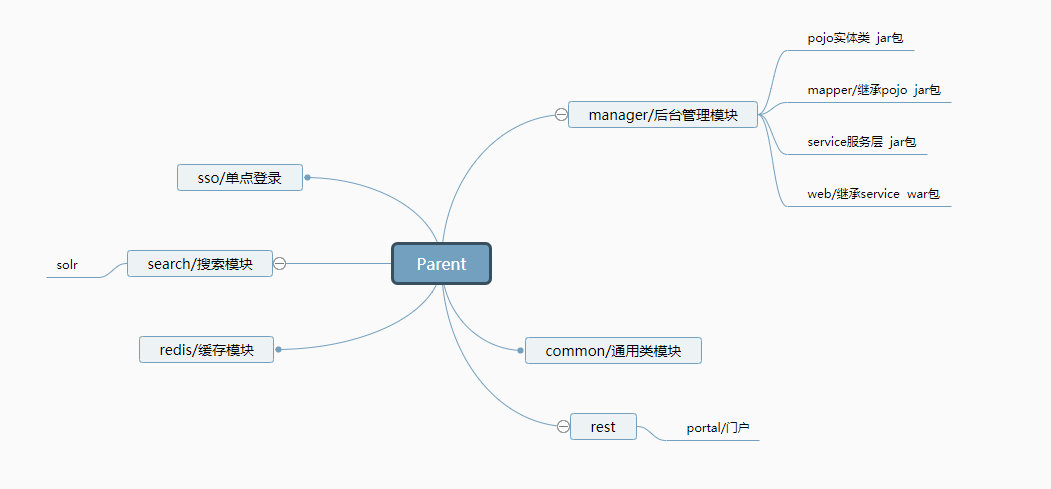
SSM项目分布式架构模块设计
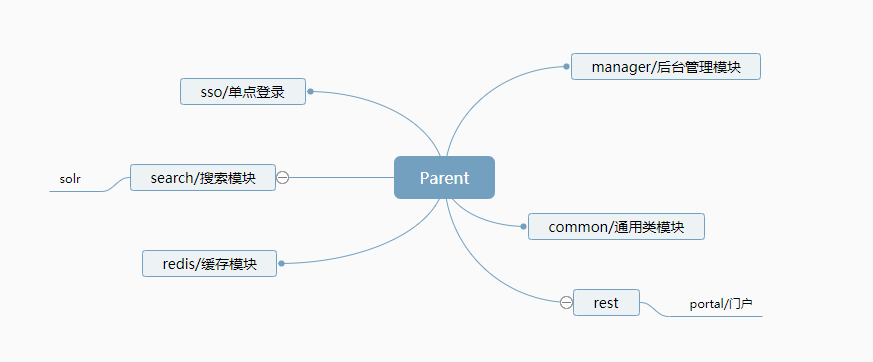
模块设计图.png

模块设计图2.png

SSM框架搭建

框架的搭建将用到Maven工具

什么是Maven

一个项目管理工具,提供了一套完整的构建生命周期的框架,亦可以是一个整合工具。它包含了一个项目对象模型 (POM:Project Object Model),一组标准集合,一个项目生命周期(Project Lifecycle),一个依赖管理系统(Dependency Management System),和用来运行定义在生命周期阶段(phase)中插件(plugin)目标(goal)的逻辑。

简单来说,就是可以自动完成一些工程的基础构建配置
例如:

  • jar包的导入。我们需要确定只有jar包的依赖关系、版本、类型。
  • 快速、集中编译
  • 过程中单元测试
  • 自动整合项目

一句话:Maven主要做编译、测试、报告、打包、部署等操作完成项目的构建。

Maven的特性

依赖管理

  • jar包的依赖
  • 工程间的依赖
  • 继承
  • 聚合

工程类型

  • war包项目
  • jar包项目
  • pom工程

Maven的安装

  1. 首先要配置好JDK的环境变量
  2. 从官网下载
  3. 配置Maven环境变量

修改配置文件

添加阿里云镜像路径

Maven文件夹/conf文件夹/settings.xml
在mirrors标签之间添加:

1
2
3
4
5
6
<mirror>
<id>alimaven</id>
<mirrorOf>central</mirrorOf>
<name>aliyun.maven.mirror</name>
<url>http://maven.aliyun.com/nexus/content/groups/public</url>
</mirror>

配置本地仓库

Maven文件夹/conf文件夹/settings.xml

1
<localRepository>D:/MavenRepository</localRepository>

用IDEA创建Maven项目

过程不赘述

SSM框架整合 — 在Manager模块实现后端管理系统

基本思路

  • spring → service
  • spring MVC → 表现层
  • Mybatis → dao 数据库

过程中我们要用到的数据库操作框架有Mybatis和druid连接池。

什么是Mybatis?

MyBatis 是一款优秀的持久层框架,它支持定制化 SQL、存储过程以及高级映射。MyBatis 避免了几乎所有的 JDBC 代码和手动设置参数以及获取结果集。MyBatis 可以使用简单的 XML 或注解来配置和映射原生类型、接口和 Java 的 POJO(Plain Old Java Objects,普通老式 Java 对象)为数据库中的记录。

什么是druid连接池

Druid是Java语言中最好的数据库连接池。Druid能够提供强大的监控和扩展功能。

引入Mybatis

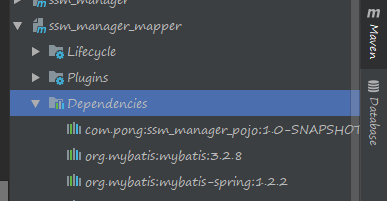
  1. Parent模块的pom.xml中配置Mybatis依赖。

  2. 在Manager模块的mapper包中的pom.xml配置一致的Mybatis依赖

  3. 在Manager模块/web包/src/mian/resource → 创建mybatis文件夹并配置sqlMapConfig.xml文件 用于构建 SqlSessionFactory

1
2
3
4
5
6
7
8
9
10
11
12
13
14
15
16
17
18
19
20
<?xml version="1.0" encoding="UTF-8" ?>
<!DOCTYPE configuration
PUBLIC "-//mybatis.org//DTD Config 3.0//EN"
"http://mybatis.org/dtd/mybatis-3-config.dtd">
<configuration>
<!--<environments default="development">
<environment id="development">
<transactionManager type="JDBC"/>
<dataSource type="POOLED">
<property name="driver" value="${driver}"/>
<property name="url" value="${url}"/>
<property name="username" value="${username}"/>
<property name="password" value="${password}"/>
</dataSource>
</environment>
</environments>
<mappers>
<mapper resource="org/mybatis/example/BlogMapper.xml"/>
</mappers> -->
</configuration>

上面为sqlMapConfig.xml文件内容,注释内容可删除,因为将通过Spring来调用

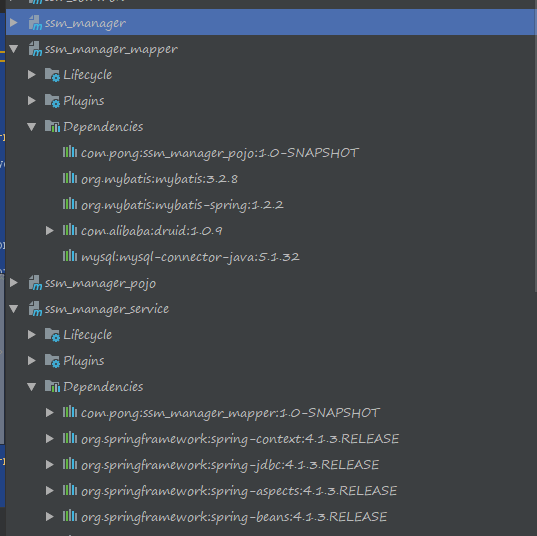
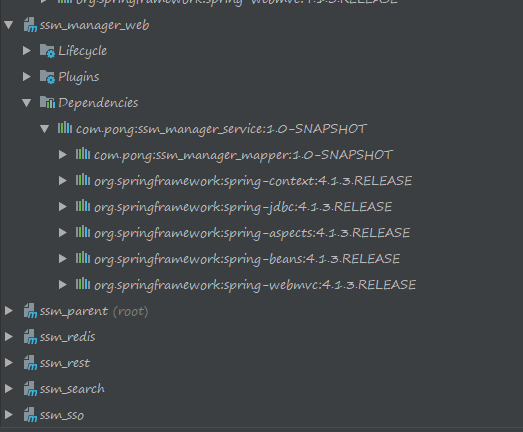
引入完成后Maven依赖情况
配置Mybatis.png

引入Spring

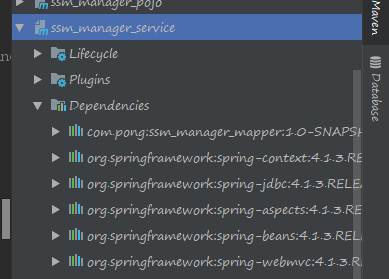
  1. 在Parent中的pom.xml中和manager模块的service包的pom.xml中配置以下依赖:

    • spring-context
    • spring-jdbc
    • spring-aspects
    • spring-beans
    • spring-webmvc
  2. 在manager模块/web包/src/mian/resource → 创建spring文件夹并配置springmvc.xml文件

    1
    2
    3
    4
    5
    6
    7
    8
    9
    10
    11
    12
    13
    14
    15
    16
    17
    18
    <beans xmlns="http://www.springframework.org/schema/beans"
    xmlns:xsi="http://www.w3.org/2001/XMLSchema-instance"
    xmlns:util="http://www.springframework.org/schema/util"
    xmlns:context="http://www.springframework.org/schema/context"
    xmlns:mvc="http://www.springframework.org/schema/mvc" xsi:schemaLocation="http://www.springframework.org/schema/context
    http://www.springframework.org/schema/context/spring-context-4.2.xsd
    http://www.springframework.org/schema/beans http://www.springframework.org/schema/beans/spring-beans.xsd
    http://www.springframework.org/schema/util http://www.springframework.org/schema/util/spring-util.xsd http://www.springframework.org/schema/mvc http://www.springframework.org/schema/mvc/spring-mvc.xsd">
    <context:component-scan base-package="com.pong.controller">
    </context:component-scan>

    <mvc:annotation-driven></mvc:annotation-driven>

    <bean class="org.springframework.web.servlet.view.InternalResourceViewResolver">
    <property name="prefix" value="/WEB-INF/jsp/"/>
    <property name="suffix" value=".jsp"/>
    </bean>
    </beans>

引入完成后Maven依赖情况
配置spring.png

引入druid连接池

  1. 在Parent中的pom.xml中和manager模块中的mapper包的pom.xml中配置druid依赖

  2. 在manager模块/web包/src/mian/resource/spring 创建以下文件:

    • applicationContext-dao.xml
    • applicationContext-trans.xml
    • applicationContext-service.xml

applicationContext-dao.xml

的配置信息可以在druid的中文使用文档中的druid参考配置找到:
https://github.com/alibaba/druid/wiki/%E5%B8%B8%E8%A7%81%E9%97%AE%E9%A2%98

1
2
3
4
5
6
7
8
9
10
11
12
13
14
15
16
17
18
19
20
21
22
23
24
25
26
27
28
29
30
31
32
33
34
35
36
37
38
39
40
41
42
43
<?xml version="1.0" encoding="UTF-8"?>
<beans xmlns="http://www.springframework.org/schema/beans"
xmlns:xsi="http://www.w3.org/2001/XMLSchema-instance"
xmlns:util="http://www.springframework.org/schema/util"
xmlns:context="http://www.springframework.org/schema/context" xsi:schemaLocation="
http://www.springframework.org/schema/context
http://www.springframework.org/schema/context/spring-context-4.2.xsd
http://www.springframework.org/schema/beans http://www.springframework.org/schema/beans/spring-beans.xsd
http://www.springframework.org/schema/util http://www.springframework.org/schema/util/spring-util.xsd">

<context:property-placeholder location = "classpath:properties/db.properties"/>

<!-- 这里用导入properrties文件来给定url,username,password的值 -->

<bean id="dataSource" class="com.alibaba.druid.pool.DruidDataSource" init-method="init" destroy-method="close">
<property name="url" value="${jdbc_url}" />
<property name="username" value="${jdbc_user}" />
<property name="password" value="${jdbc_password}" />
<property name="filters" value="stat" />
<property name="maxActive" value="20" />
<property name="initialSize" value="1" />
<property name="maxWait" value="60000" />
<property name="minIdle" value="1" />
<property name="timeBetweenEvictionRunsMillis" value="60000" />
<property name="minEvictableIdleTimeMillis" value="300000" />
<property name="testWhileIdle" value="true" />
<property name="testOnBorrow" value="false" />
<property name="testOnReturn" value="false" />
<property name="poolPreparedStatements" value="true" />
<property name="maxOpenPreparedStatements" value="20" />
</bean>

<!--配置Mybatis-spring-->
<bean id="sqlSessionFactory" class="org.mybatis.spring.SqlSessionFactoryBean">
<property name="configLocation" value="classpath:mybatis/sqlMapConfig.xml"/>
<property name="dataSource" ref="dataSource" />
</bean>

<bean class="org.mybatis.spring.mapper.MapperScannerConfigurer">
<property name="basePackage" value="com.pong.mapper"/>
</bean>

</beans>

!!:额外在manager模块/web包/src/mian/resource/ 创建一个perproties文件夹并配置一个db.perproties文件

db.perproties

1
2
3
jdbc_url =  
jdbc_user =
jdbc_password =

applicationContext-service.xml

1
2
3
4
5
6
7
8
9
10
11
12
13
<beans xmlns="http://www.springframework.org/schema/beans"
xmlns:xsi="http://www.w3.org/2001/XMLSchema-instance"
xmlns:util="http://www.springframework.org/schema/util"
xmlns:context="http://www.springframework.org/schema/context" xsi:schemaLocation="
http://www.springframework.org/schema/context
http://www.springframework.org/schema/context/spring-context-4.2.xsd
http://www.springframework.org/schema/beans http://www.springframework.org/schema/beans/spring-beans.xsd
http://www.springframework.org/schema/util http://www.springframework.org/schema/util/spring-util.xsd">

<context:component-scan base-package="com.pong.service"></context:component-scan>


</beans>

applicationContext-trans.xml

1
2
3
4
5
6
7
8
9
10
11
12
13
14
15
16
17
18
19
20
21
22
23
24
25
26
27
28
29
30
31
32
33
<beans xmlns="http://www.springframework.org/schema/beans"
xmlns:xsi="http://www.w3.org/2001/XMLSchema-instance"
xmlns:util="http://www.springframework.org/schema/util"
xmlns:context="http://www.springframework.org/schema/context" xmlns:tx="http://www.springframework.org/schema/tx"
xmlns:aop="http://www.springframework.org/schema/aop"
xsi:schemaLocation="http://www.springframework.org/schema/context
http://www.springframework.org/schema/context/spring-context-4.2.xsd
http://www.springframework.org/schema/beans http://www.springframework.org/schema/beans/spring-beans.xsd
http://www.springframework.org/schema/util http://www.springframework.org/schema/util/spring-util.xsd http://www.springframework.org/schema/tx http://www.springframework.org/schema/tx/spring-tx.xsd http://www.springframework.org/schema/aop http://www.springframework.org/schema/aop/spring-aop.xsd">
<bean id="transactionManager"
class="org.springframework.jdbc.datasource.DataSourceTransactionManager">
<property name="dataSource" ref="dataSource"/>
</bean>

<tx:advice id="txAdvice" transaction-manager="transactionManager">
<tx:attributes>
<tx:method name="save*" propagation="REQUIRED"/>
<tx:method name="insert*" propagation="REQUIRED"/>
<tx:method name="add*" propagation="REQUIRED"/>
<tx:method name="create*" propagation="REQUIRED"/>
<tx:method name="delete*" propagation="REQUIRED"/>
<tx:method name="update*" propagation="REQUIRED"/>
<tx:method name="find*" propagation="SUPPORTS" read-only="true"/>
<tx:method name="select*" propagation="SUPPORTS" read-only="true"/>
<tx:method name="get*" propagation="SUPPORTS" read-only="true"/>
</tx:attributes>
</tx:advice>

<aop:config>
<aop:advisor advice-ref="txAdvice"
pointcut="execution(* com.pong.service.*.*(..))"/>
</aop:config>
</beans>

引入MySQL

  1. 在Parent中的pom.xml中和manager模块的mapper包的pom.xml配置MySQL依赖

  2. 用SQLyog工具在创建数据库和一个测试用表

引入Tomcat

在manager的pom.xml配置tomcat7-maven-plugin插件

测试准备

  1. 在web包的webapp文件夹(没有的话创建一个)中创建WEB-INF文件夹,通过idea生成web.xml,并作如下配置

    1
    2
    3
    4
    5
    6
    7
    8
    9
    10
    11
    12
    13
    14
    15
    16
    17
    18
    19
    20
    21
    22
    23
    24
    25
    26
    27
    28
    29
    30
    31
    32
    33
    34
    35
    36
    37
    38
    39
    40
    41
    42
    43
    44
    45
    46
    47
    48
    49
    50
    51
    52
    53
    54
    55
    56
    57
    <?xml version="1.0" encoding="UTF-8"?>
    <web-app xmlns="http://xmlns.jcp.org/xml/ns/javaee"
    xmlns:xsi="http://www.w3.org/2001/XMLSchema-instance"
    xsi:schemaLocation="http://xmlns.jcp.org/xml/ns/javaee http://xmlns.jcp.org/xml/ns/javaee/web-app_4_0.xsd"
    version="4.0">

    <display-name>pong-manager</display-name>

    <welcome-file-list>
    <welcome-file>index.html</welcome-file>
    <welcome-file>index.html</welcome-file>
    <welcome-file>index.jsp</welcome-file>
    </welcome-file-list>

    <!--加载spring容器-->
    <context-param>
    <param-name>contextConfigLocation</param-name>
    <param-value>classpath:spring/applicationContext-*.xml</param-value>
    </context-param>

    <listener>
    <listener-class>org.springframework.web.context.ContextLoaderListener</listener-class>
    </listener>

    <!--解决post乱码-->
    <filter>
    <filter-name>CharacterEncodingFilter</filter-name>
    <filter-class>org.springframework.web.filter.CharacterEncodingFilter</filter-class>
    <init-param>
    <param-name>encoding</param-name>
    <param-value>utf-8</param-value>
    </init-param>
    </filter>

    <filter-mapping>
    <filter-name>CharacterEncodingFilter</filter-name>
    <url-pattern>/*</url-pattern>
    </filter-mapping>

    <!--springmvc的前端控制器-->
    <servlet>
    <servlet-name>pong-manager</servlet-name>
    <servlet-class>org.springframework.web.servlet.DispatcherServlet</servlet-class>

    <init-param>
    <param-name>contextConfigLocation</param-name>
    <param-value>classpath:spring/springmvc.xml</param-value>
    </init-param>

    <load-on-startup>1</load-on-startup>
    </servlet>

    <servlet-mapping>
    <servlet-name>pong-manager</servlet-name>
    <url-pattern>/</url-pattern>
    </servlet-mapping>
    </web-app>
  2. 在webapp文件夹创建一个简单的jsp文件

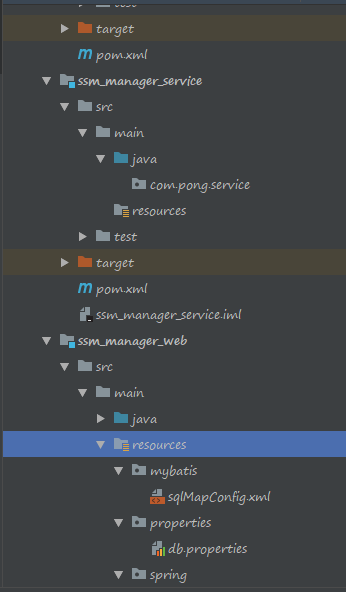
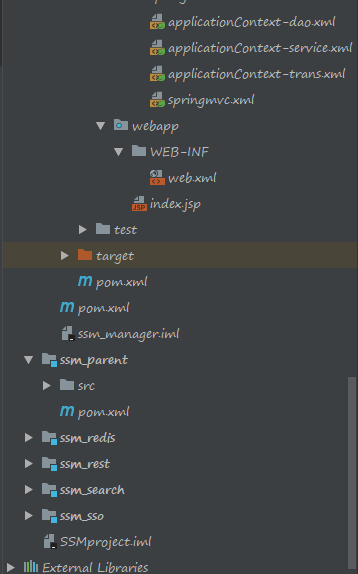
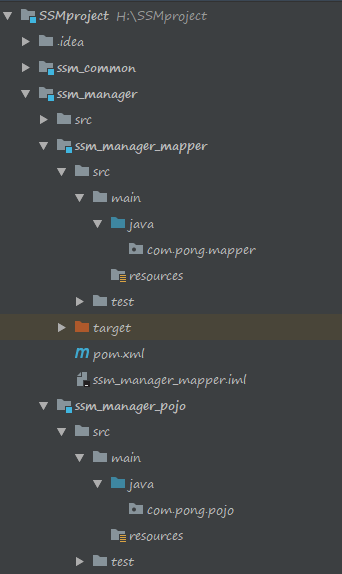
所有工作基本完成,文件夹情况和Maven依赖情况如下
文件夹目录1.png

文件夹目录2.png

文件夹目录3.png

Maven依赖1.png

Maven依赖2.png

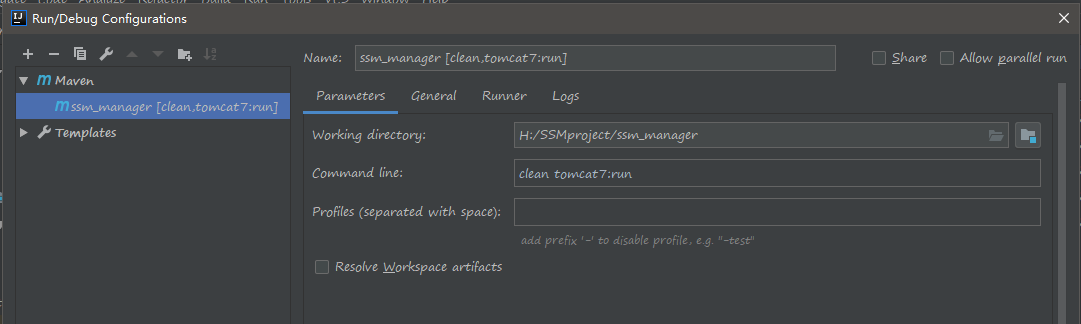
测试

测试运行配置.png

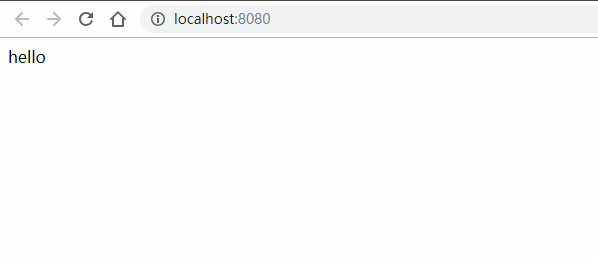
测试结果.png

SSM框架整合完成第一步