JavaScript / jQuery 也有静态方法和实例方法!

1
2
3
4
5
6
7
8
9
10
11
12
13
14
15
16
17
18
19
function testClass(){
} //定义一个类

//给这个类添加一个静态方法
testClass.staticMethod = function(){
alert("我是一个静态方法")
}

//通过类名直接调用
testClass.staticMehod();

//给类添加一个实例方法
testClass.prototype.instanceMethod = function(){
alert("我是一个实例方法");
}

//创建一个对象来调用实例方法
var test = new testClass();
test.instanceMethod();

jQuery静态方法 — each方法

each()方法和原生JavaScript的forEach()类似,都可以用来遍历
这里用遍历数组来简单区分两者差别:

1
2
3
4
5
6
7
8
9
10
11
12
13
14
15
16
17
18
19
20
21
22
23
24
25
26
27
28
29
30
31
32
33
34
35
36
37
38
  <script type="text/javascript" src="js/jquery-1.12.4.js"></script>
<script>
var arr = [1, 3, 5, 7, 9];
//创建一个伪数组
//1.伪数组是一个对象
//2.伪数组有length属性,且length的值为正整数
var arr2 = {
0: 1,
1: 3,
2: 5,
3: 5,
4: 9,
length: 5
}

console.log("用forEach方法遍历数组:");

arr.forEach(function(value, index) {
console.log(index, value);

})
console.log("用forEach方法遍历伪数组:");

arr.forEach(function(value, index) {
console.log()
})
console.log("---------------------------------");
console.log("用each方法遍历数组:");

$.each(arr, function(index, value) {
console.log(index, value);
})
console.log("用each方法遍历伪数组:");

$.each(arr2, function(index, value) {
console.log(index, value);
})
</script>

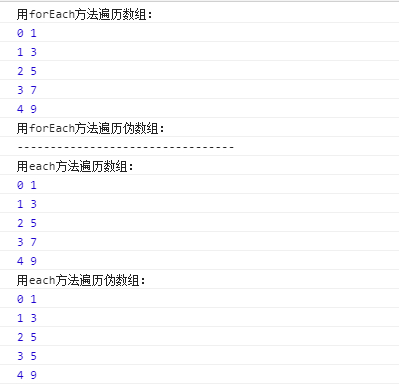
运行结果:

1.jpg

总结有以下两点区别

  1. forEach(value,index); 第一个参数是遍历的元素,第二个参数是遍历的索引;
    each(index,value); 第一个参数是遍历的索引,第二个参数是遍历的元素;
  2. forEach(); 不能遍历伪数组,each(); 可以遍历伪数组;

jQuery静态方法 — map方法

使用map()方法返回的是一个新数组,数组中的元素为原始数组元素调用函数处理的后值。
这里同样用遍历数组来简单区分原生js的map方法和jQuery的map方法的差别:

1
2
3
4
5
6
7
8
9
10
11
12
13
14
15
16
17
18
19
20
21
22
23
24
25
26
27
28
29
30
31
32
33
<script type="text/javascript" src="js/jquery-1.12.4.js"></script>

<script>
var arr = [1, 3, 5, 7, 9];
var arr2 = {
0: 1,
1: 3,
2: 5,
3: 5,
4: 9,
length: 5
}
console.log("用原生js的map方法遍历数组:");
arr.map(function(value, index, array) {
console.log(index, value, array);
});

console.log("用原生js的map方法遍历伪数组:");
arr2.map(function(value, index, array) {
console.log(index, value, array);
});

console.log("--------------------------------------");
console.log("用jQuery的map方法遍历数组:");
$.map(arr, function(value, index) {
console.log(index, value)
})

console.log("用jQuery的map方法遍历伪数组:");
$.map(arr2, function(value, index) {
console.log(index, value)
})
</script>

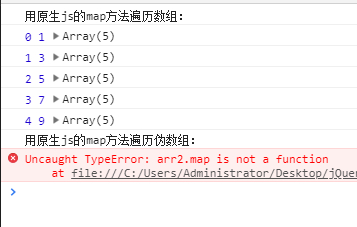
运行之后发现原生js的map方法遍历伪数组报错:

2.jpg

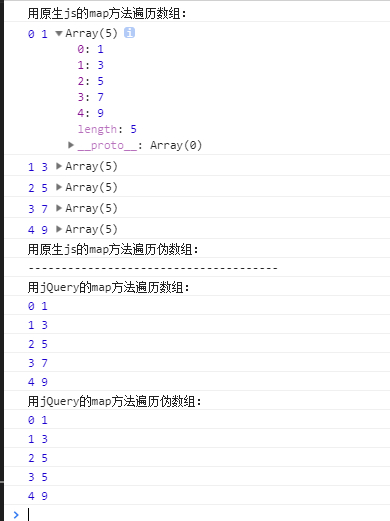
将其注释掉后运行:

3.jpg

总结

  1. 利用原生js的map方法遍历数组 arr.map(function(value, index, array)
    其中arr为要遍历的数组变量名;
    第一个参数:当前遍历到的元素;
    第二个参数:当前遍历到的索引;
    第三个参数:当前遍历得到的数组;
    且和原生forEach一样,不能遍历伪数组!

  2. 利用jQuery的map方法遍历数组 $.map(arr, function(value, index)
    第一个参数:要遍历的数组
    第二个参数:每遍历一个元素之后执行的回调函数
    回调函数的参数:
    第一个参数:遍历到的元素
    第二个参数:遍历到的索引
    和jquery中的each静态方法一样,map静态方法可以遍历伪数组

都是对数组的遍历,each和map存在什么区别呢?

1
2
3
4
5
6
7
8
9
10
11
12
13
14
15
16
17
18
var n = $.map(arr2, function(value, index) {
console.log(index, value)
})
console.log("---------------------------------")
var n1 = $.map(arr2, function(value, index) {
console.log(n1);
return value + index
})
console.log("---------------------------------")
var n2 = $.each(arr2, function(index, value) {
console.log(index, value);
return value + index
})

console.log("---------------------------------")
console.log(n);
console.log(n1);
console.log(n2);

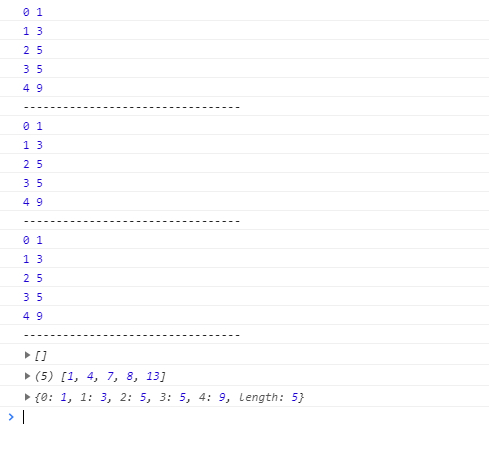
运行代码:

4.jpg

由此可见 map的遍历默认返回一个空数组,但可以通过return对遍历的数组进行操作然后返回一个新数组
而each遍历谁返回谁,不能对数组进行操作。

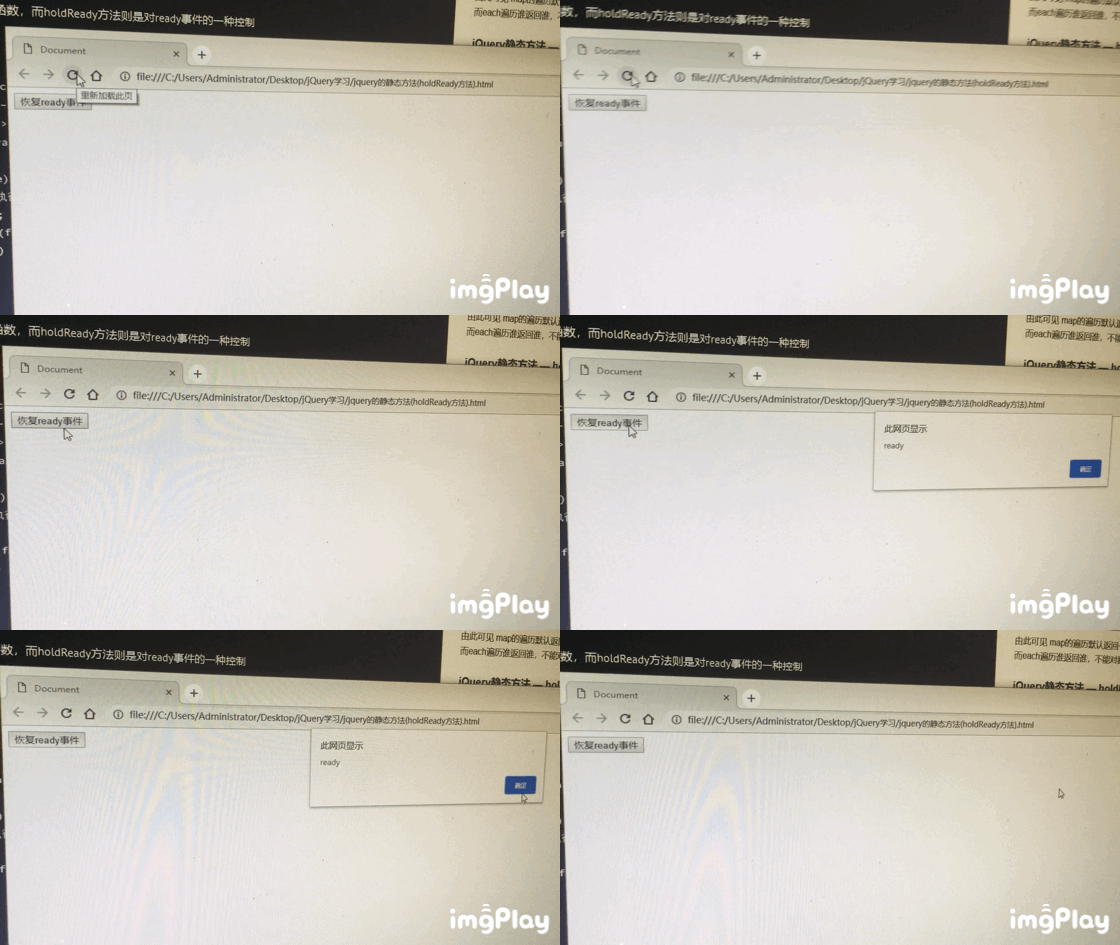
jQuery静态方法 — holdReady方法

reay事件是指在html加载后激活函数,而holdReady方法则是对ready事件的一种控制

1
2
3
4
5
6
7
8
9
10
11
12
13
14
15
16
17
18
19
20
21
22
23
24
25
26
27
28
<head>
<meta charset="UTF-8">
<meta name="viewport" content="width=device-width, initial-scale=1.0">
<meta http-equiv="X-UA-Compatible" content="ie=edge">
<title>Document</title>
<script type="text/javascript" src="js/jquery-1.12.4.js"></script>
<script>
//$.holdReady(true);
//作用:暂停ready的执行
$.holdReady(true);
$(document).ready(function() {
alert("ready")
});
</script>

</head>

<body>
<button>恢复ready事件</button>
<script>
var btn = document.getElementsByTagName("button")[0];
btn.onclick = function() {
$.holdReady(false);
//$.holdReady(false);
//作用:恢复ready的执行
}
</script>
</body>

5.jpg

jQuery其他静态方法

  1. $.trim();
    作用:去除字符串两端的空格
    参数:需要去除空格的字符串变量名
    返回值:去除空格后的字符串

  2. $.isWindow();
    作用:判断传入的对象是否是Windows对象
    返回值:true/false

  3. $.isArray();
    作用:判断传入的对象是否是真数组
    返回值:true/false

  4. $.isFunction();
    作用:判断传入的对象是否是函数
    返回值:true/false
    运用过程中发现jQuery本质就是一个函数

    1
    2
    3
    4
    5
    6
    7
    8
    9
    10
    11
    12
    13
    14
    15
    16
    17
    18
    19
    20
    21
    22
    23
    24
    25
    26
    27
    28
    29
    30
    31
    32
    33
    34
    35
    36
    37
    38
    39
    40
    41
    42
    43
    44
    45
    46
    47
    48
    49
    50
    51
    52
    53
    54
    55
    56
    57
    58
    59
    60
    61
    62
    63
    64
    65
    66
    67
    68
    69
    <script type="text/javascript" src="js/jquery-1.12.4.js"></script>
    <script>
    /*
    $.trim();
    作用:去除字符串两端的空格
    参数:需要去除空格的字符串变量名
    返回值:去除空格后的字符串
    */
    console.log("除字符串两端的空格")
    var str = " str ";
    console.log("---" + str + "---");
    var new_str = $.trim(str);
    console.log("---" + new_str + "---");

    //数组
    var arr = [1, 3, 5, 7, 9];
    //伪数组
    var arr2 = {
    0: 1,
    1: 3,
    2: 5,
    3: 5,
    4: 9,
    length: 5
    }
    //对象
    var obj = {
    "name": "wxp",
    "age": 21
    };
    //函数
    var fn = function() {};
    //Windows对象
    var w = window;

    /*
    $.isWindow();
    作用:判断传入的对象是否是Windows对象
    返回值:true/false
    */
    console.log("--------------------------")
    console.log("判断传入的对象是否是Windows对象")
    var res = $.isWindow(w);
    console.log(res);


    /*
    $.isArray();
    作用:判断传入的对象是否是真数组
    返回值:true/false
    */
    console.log("--------------------------")
    console.log("判断传入的对象是否是真数组")
    var res1 = $.isArray(arr);
    console.log(res1);

    /*
    $.isFunction();
    作用:判断传入的对象是否是函数
    返回值:true/false
    jQuery本质就是一个函数
    */
    console.log("--------------------------")
    console.log("判断传入的对象是否是函数")
    var res2 = $.isFunction(fn);
    var res3 = $.isFunction(jQuery);
    console.log(res2);
    console.log(res3); //true
    </script>

运行结果:
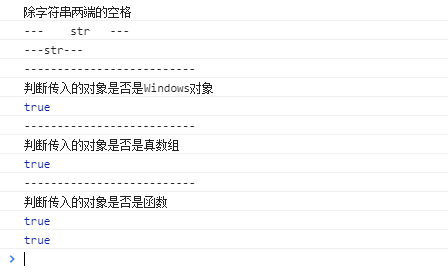
6.jpg